Cloud-managed network
NetCom Security Group
Cloud-managed network: all the house's network equipment in one dashboard, alerts when something stops, remote support, several properties under the same rules.
This page is part of the section Networks, Wi-Fi and internet connectivity.
A cloud-managed network is one in which the gateway, switches and access points are controlled from a single management console reachable over the internet: you can see the status of every device, receive alerts when something stops and intervene remotely without entering the house. NetCom Security Group proposes it for large houses, second homes and for those who manage several properties, with support from our own technicians.
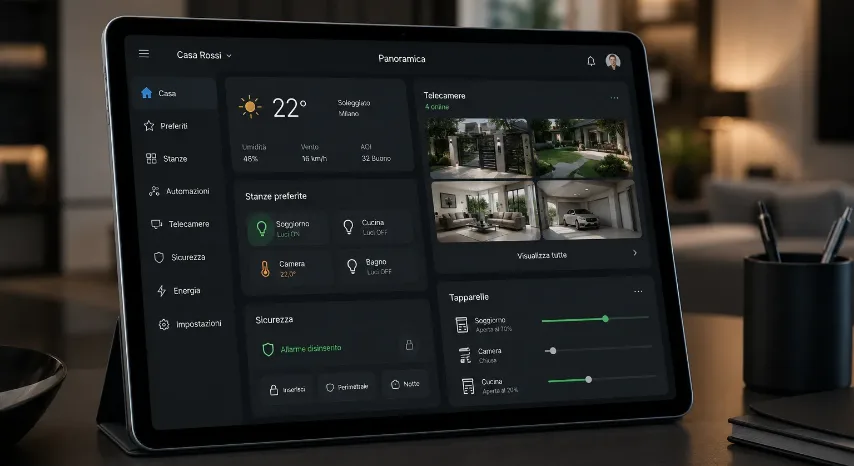
In plain words: the house's network has a dashboard. From the dashboard you can see whether the access point on the second floor is on, whether the gate camera is receiving power, how many devices are connected and how much traffic is flowing. If a device goes off, an alert arrives; if a camera freezes, it is restarted from there. For the owner it means fewer calls and less waiting; for those who live far away, the certainty that the house is connected.
Why it matters for a large house
A house with three floors, a garden, a guest house, ten cameras and twenty fixed devices is a small infrastructure. Without a management console, a fault is discovered when someone notices it: the Wi-Fi that does not reach the basement, the camera that has not recorded for three days. With the console the fault is seen immediately, often before anyone notices, and the intervention starts remotely. The configuration of the whole network is saved: if a device breaks, the new one receives its settings by itself as soon as it is connected.
The network keeps working even if the console is unreachable: the devices keep their settings and work on their own; the console is there to view, change and receive alerts, not to carry the traffic.
How we set it up
- One site for every house. Each property has its own console, with the map of the devices and networks; those with several houses see them all in one list.
- Adoption of the devices. Gateway, switches and access points are registered in the console and receive the configuration decided in the design.
- Useful alerts. Together with the client we choose which events deserve an alert: device off, camera without power, internet line down, unknown device connected.
- Access and roles. The owner sees everything; the caretaker or the administrator only what they need; our own technicians intervene with tracked access, on request.
- Support over time. Security updates, periodic checks and remote interventions, with a visit when it is really needed.

What it includes
For those who manage several properties
Those who look after several villas, an administrator, a property manager, a family with a house at the lake and one in the city, find in the console a list of all the houses and the status of each. A rule decided once, for example the guest network that expires on departure, applies to all of them. A problem in one house shows up in the list and is solved from there. For those who live abroad it is the simplest way to know that everything is working: see the page for owners living abroad.
Together with the other systems
The console controls the network equipment: the home gateway and firewall, the PoE switches and access points, the Wi-Fi described in Wi-Fi for large houses and villas. Through the network it also keeps an eye on the power supply to the video surveillance cameras and the home automation devices. Updates matter for the alarm too, as we explain in our article on connected alarms and updates. For faults that need a person there is our 24/7 support.
Frequently asked questions
What does "cloud-managed network" mean and what is the benefit for a large house?
It means that the gateway, switches and access points are controlled from a single management console reachable over the internet: you see the status of every device, alerts arrive when something stops and you intervene remotely. For a large house the benefit is discovering faults before anyone notices them and solving them without a visit; NetCom uses it in every network it designs.
Does the network stop working if the cloud console is unreachable?
No. The devices keep their settings and continue to carry the traffic even without the console; at that moment you simply cannot make changes or receive alerts. NetCom designs the network so that it works on its own and uses the console to view it and support it.
Who can see my network in the console?
The owner and the people they authorise, each with their own role: the caretaker sees the status, the administrator manages the guests, NetCom technicians intervene on request with tracked access. No access stays open without the owner knowing.
Which alerts arrive and to whom?
Those chosen with the client: device off, camera without power, internet line down, unknown device connected, blocked access attempt. NetCom sets them up so that they reach the right person, by app or email, without filling your phone with useless notifications.
Is a subscription needed for the console?
It depends on the level of functions required: the basic functions for a house are included in the installation, while some advanced services and NetCom's ongoing support carry a fee. We explain it in writing in the proposal, with no surprises afterwards.
Can I manage the lake house and the city house from the same console?
Yes: each house is a site in the same console, with its own map and its own alerts, and the common rules apply to all of them. NetCom does this for families with several houses and for those who manage other people's properties, with different permissions for each person.
See also
Text by NetCom Security Group. Last updated: 31 October 2026.
Let's talk about your project
Tell us where the house or business is and what the network has to do: we will get back to you to arrange the site visit. You can also call +39 045 245 7879.